Produkte oder Services manuell verlängern
Sie können Ihre Produkte jederzeit manuell verlängern. Dies gilt auch dann, wenn hierfür die automatische Verlängerung aktiviert ist.
Note: If you're looking to renew an expired domain, the steps are different.
- Gehen Sie zu Ihrer Seite Verlängerungen und Abrechnung und wählen Sie dort Abonnements verwalten aus.
- In the Subscriptions list, select the product and then select Extend Term.
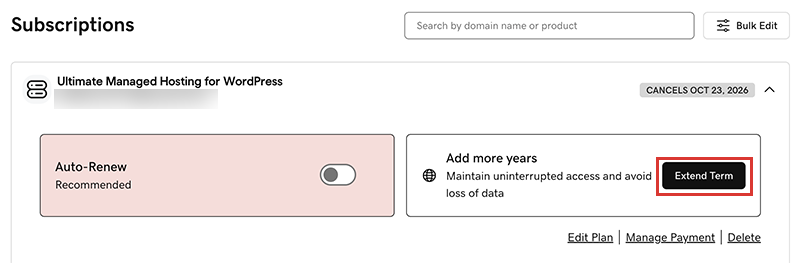
We'll take you to the Cart, where you can see the renewal price.Note: If you see Renew Now instead of Extend Plan, select Renew Now to confirm the payment method to use for the renewal. - Befolgen Sie die Anweisungen, um Ihren Verlängerungskauf abzuschließen.
Note: Products auto-renew for the same length of time as their most recent manual renewal, instead of their original registration length. This also applies to domains that are manually renewed after July 16, 2020. For example, if a domain is manually renewed after July 16, 2020 for a three-year term, it will auto-renew for the same three-year term when the time comes. For full details, see our Domain Name Registration Agreement.
Ähnliche Schritte
- Hier erfahren Sie, wie Sie eine abgelaufene Domain verlängern.
- Sie können die automatische Verlängerung aktivieren, damit Sie Ihre Produkte nicht manuell verlängern müssen.
- Or, cancel a subscription to turn off auto-renewals.
Weitere Informationen
- Aktualisieren Sie Ihre Zahlungsmethode: Ändern Sie das Ablaufdatum Ihrer Kreditkarte oder die Rechnungsadresse.