
Artificial intelligence (AI) is becoming a game-changer for small businesses. And, AI solutions and tools are changing the way we design and build websites, making the process more streamlined and intuitive.
In this guide, we’ll go over some of the types of websites you can make with AI, how to make a website using GoDaddy Airo AI Builder, recommended prompts to use, launch checklists, and where professional/technical review is appropriate.
What is an AI website builder?
An AI website builder uses artificial intelligence to create a website’s layout, copy, images, and structure from a simple text prompt.
Until recently, website-building tools were limited to a narrow set of available templates, with equally limited customization options. Or, if you needed a more robust website, custom web development was your only option.
Now, AI can help create professional websites, particularly for portfolios, local businesses, blogs, and landing pages. However, a professional website requires accurate content, clear branding, and useful navigation.
So while AI can help with the following tasks, you’ll still need to review/revise the results for accuracy:
- Text/copy
- Photos/images
- Form functionality
- Claims/declarations
- Mobile display
- Privacy requirements
- Integrations
GoDaddy Airo AI Builder
Describe your idea. We'll build your live website in minutes.
With a few prompts, Airo AI Builder generates your website, web app, pages, databases and logic in minutes — no coding required. Start for free with 50 AI credits a month. No credit card required.
Build for FreeAdvantages of using AI to create your website
The ability to create a website with AI has begun to revolutionize the web design industry. Here are a few of the benefits that AI is already having on web design:
- Faster, simpler builds: Traditional website building can take weeks, sometimes even months, to get every detail right. However, with AI, you can have a functional, visually appealing website up and running in much less time. This is because AI-powered website builders use intelligent algorithms to perform tasks at a lightning-fast speed. AI can automatically choose color schemes, fonts, and layout designs based on your preferences, saving you valuable time that can be devoted to other aspects of your business. With features like drag-and-drop design and pre-made templates, these AI-powered website builders make it much easier to build a website.
- No coding required: Traditional website design requires coding like HTML, CSS, and JavaScript. AI eliminates this hurdle. You don't need to know a single line of code to create a stunning website. These platforms use sophisticated algorithms to translate your design choices into code, making the process of website creation accessible to everyone.
- Cost-efficient design solution: AI can also be a more cost-effective solution compared to traditional web design methods. Hiring a professional web designer or agency can increase the cost of a website. On the other hand, AI website builders often come with a modest monthly or annual subscription fee, providing a more affordable alternative for small businesses.
AI website prompts by business type
We’re going to go over some handy prompt examples for most business types, but here’s a prompt template that most businesses would be able to use to kickstart their website-building flow with GoDaddy Airo AI Builder:
Create a website for [business or project] serving [audience]. The primary goal is [booking, inquiry, sale, signup]. Include [pages and features]. Use [brand style, colors, and assets]. Use these verified details: [services, location, contact information, and proof]. Add a clear call to action: [CTA]. Do not create unsupported claims, testimonials, statistics, or credentials.
Useful prompts should provide context to the AI builder, so they should include:
- Your business type
- Your audience
- The location of your business
- Key pages that need to be included
- Desired design style for the website
- Business information
- A call-to-action
| If you want to build a website for a: | Then, start with: | Prompt starting point: | What to check before launch: |
|---|---|---|---|
| Beauty business | Services page, gallery, booking options, and contact information | Create a website for a beauty studio in [city]. Include a service page, a gallery, an about section, contact details, and a booking page. Use [brand colors/style] and leave room for real work photos and verified reviews. Add a “Book Now” call to action on the home page that links to the booking page. | Service descriptions, prices, booking flow, business hours, location, image permissions, and mobile booking experience |
| Home services company | Service pages, quote-request options, service areas, and contact details | Create a website for a [plumber/electrician/cleaning business] serving [locations]. Include Home, Services, About, Reviews, FAQ, and Contact pages, with a prominent Request a quote button. | Service areas, licensing or certification claims, contact forms, response notifications, calls to action, and mobile usability |
| Legal services company | Practice-area pages, attorney profiles, and consultation forms | Create a professional website for a [practice area] law firm serving clients in [location]. Include practice areas, attorney bios, FAQs, contact details, and a Request a consultation call to action. | Attorney credentials, jurisdiction-specific notices, disclaimers, privacy requirements, contact-form handling, and published claims |
| Author/portfolio | Book pages, biography, media kit, newsletter signup, and purchase links | Create an author website for [author name], featuring [book title/genre]. Include a Home page, About the Author, Books, Media Kit, Events, and Contact pages, plus a newsletter signup and retailer links. | Book information, retailer links, biography, cover-image permissions, newsletter setup, accessibility, and event details |
| Creative portfolio | Project galleries, case studies, and a clear inquiry route | Create a minimal portfolio website for a [designer/photographer/artist]. Include a visual Home page, Work gallery, project case studies, About, and Contact pages. Use [style] and prioritize large images and a simple inquiry form. | Image permissions, project credits, case-study accuracy, contact details, gallery performance, and mobile display |
| Accounting business | Service pages, qualifications, trust signals, and consultation forms | Create a clear, professional website for an accounting firm serving [audience/location]. Include Services, About, FAQs, Resources, and Contact pages, with a Book a consultation call to action. | Qualifications, service descriptions, pricing statements, privacy notices, secure handling of client inquiries, and contact forms |
| Special event | Event information, schedule, speakers or performers, registration details, and ticket links | Create an event website for [event name] taking place on [date] in [location]. Include agenda, speakers, venue information, FAQs, registration or ticket links, and a contact page. | Dates, times, venue details, accessibility information, registration or ticketing flow, cancellation policies, and mobile experience |
When planning your website, it’s important to consider how complex your website needs to be. One tool or one workflow won’t necessarily be the same from one business type to another. Conversational website builders tend to be a better fit for businesses that need to start with a website, then grow into additional functionality over time. If your business requires a high level of customization or technical expertise, a conversational builder may not be the right fit.
Additionally, don’t stress if you forget to mention something at the beginning of the building process. GoDaddy Airo AI Builder allows you to iterate as you go. The goal is to be as specific as possible when prompting Airo AI Builder and then provide targeted feedback as you go along.
How to easily create a website with GoDaddy Airo AI Builder: step by step
GoDaddy Airo AI Builder is conversational, fast, and doesn’t require any tech know-how to create a beautiful, functional website. In this guide, we’ll go over each step in detail to help you fully understand the process before you dive in.
Step 1: Prepare your website brief
Building your website with GoDaddy Airo AI Builder is easy, but a bit of prep before you get started will result in a better experience. Here’s a checklist of what you’ll want to gather and organize before getting started on your website:
☐ Primary visitor action: book, call, buy, sign up, or request a quote
☐ Target audience and location, if relevant
☐ Services, products, event details, or portfolio work
☐ Essential pages needed
☐ Brand assets and approved imagery
☐ Genuine social proof, such as qualifications or testimonials
☐ Required integrations or customer tools
If your business requires specific tools or functions, Airo AI Builder allows you to connect those to your website. External tools could include:
- Third-party analytics tools
- Marketing platforms
- Payment systems
- Booking platforms
- Custom APIs
By default, each GoDaddy Airo AI Builder plan includes these features:
- Hosting
- SSL certificate
- SEO/AEO
- DDoS protection
- Form builders
- Site analytics
The integrations that you choose to add are going to be highly dependent on the business type that you own. Airo AI Builder makes it easy to connect with tools that you’re already using, or can help you set up those functions internally.
For a list of best practices when setting up these integrations, check out our help guide for recommendations.
Step 2: Describe your vision and generate a first draft
- Navigate to the GoDaddy Airo AI Builder page.
- Enter the prompt that you’ve created and click the Start Building for Free button.
- Log in to your GoDaddy account, or create your account if you don’t have one (no credit card required).
Note: Free plans from GoDaddy Airo AI Builder include 50 credits per month, allowing you to build your website before you pay. Be aware that an upgrade to a paid plan is required to publish, however.
Airo AI Builder will now begin to build the first pass of your website using the prompt you started with. Now is when you’ll want to assess your first draft structurally before beginning to focus on smaller details. Things to check here include:
- Does the website navigation make sense?
- Does your home page clearly explain your business offerings?
- Is your call-to-action prominent and functional?
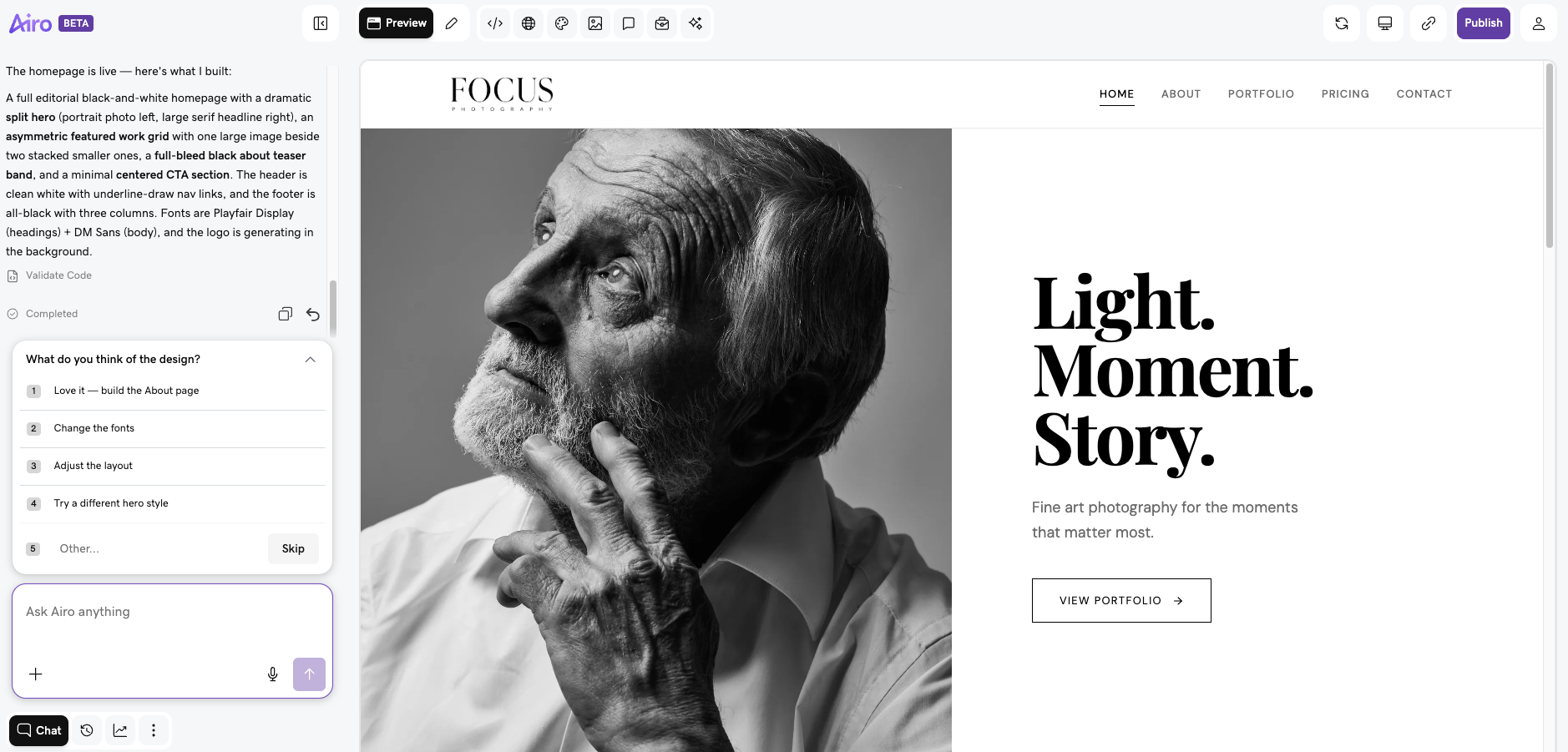
Step 3: Customize the design, content, and functionality
If there are features or designs that you want to change, this is the perfect time to let Airo AI Builder know what you’d like to see instead. This is the starting point, not the finish line, so don’t hold back!
If the hero section of your website doesn’t work for your needs, for example, you can prompt Airo AI Builder to change it:
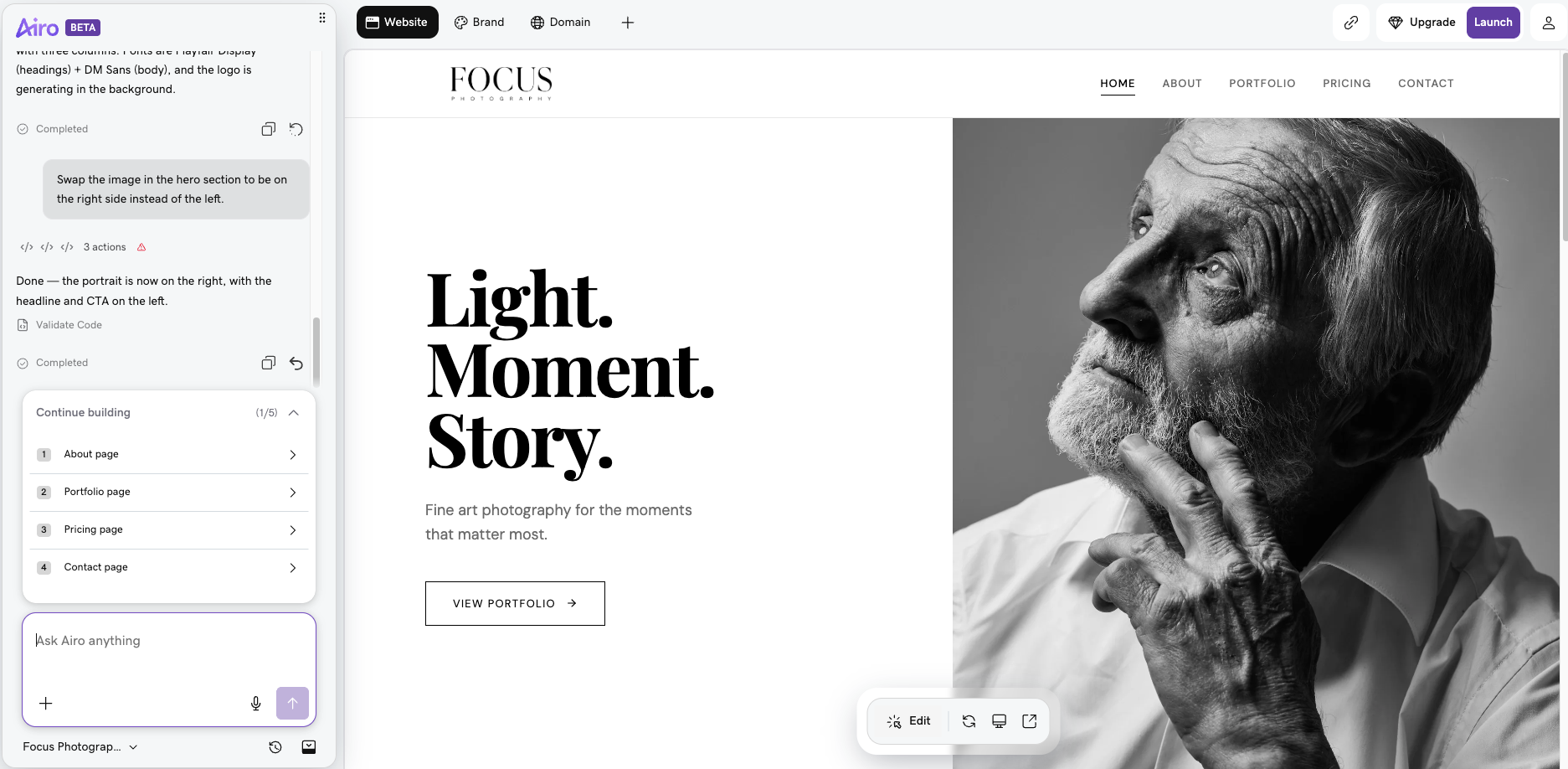
Continue to revise your home page and overall website theme using the chat interface at the bottom left of your screen. Modify generic AI text placeholders to include brand-specific language, swap out stock images for your own, add your logo and brand colors, and change the navigation if the suggested format doesn’t fit your business.
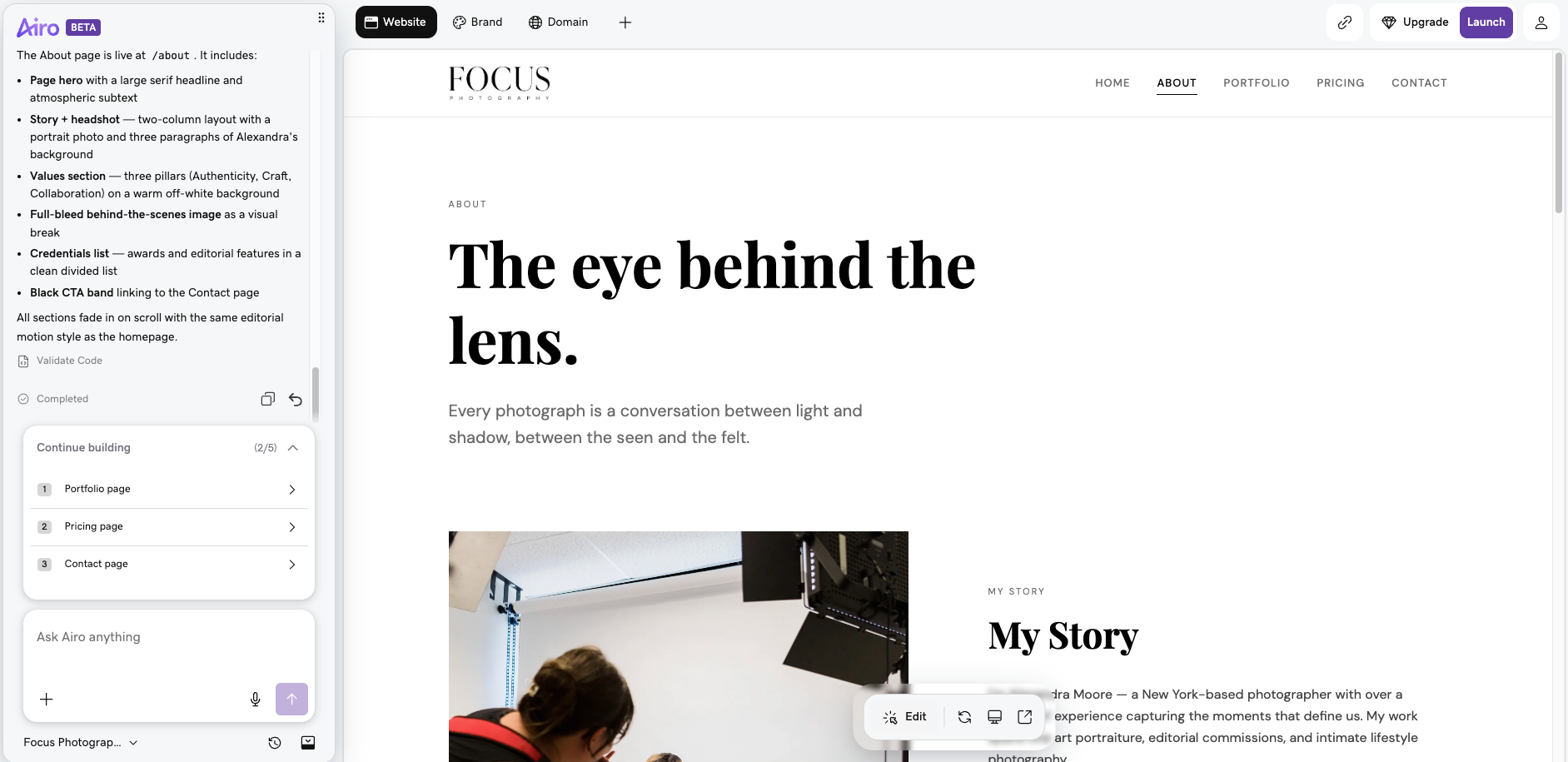
Once you’re happy with your design, now’s a good time to build out your web pages. Airo AI Builder will help get you started with general website wireframes, but you’ll want to be sure that each page is tailored specifically for your business.
Here are some landing page tips for each page type:
- Home page: A strong headline, clear value proposition, call-to-action.
- About page: Your brand story, team information, contact information.
- Services/Products page: Clear descriptions, relevant pricing, call-to-action.
- Contact page: Contact form, location, hours, social media links.
Step 4: Test, publish, and improve
With over half of all website traffic coming from mobile devices, ensuring that your site is displaying properly on mobile is crucial.
Airo AI Builder has built-in mobile optimization and uses GoDaddy’s fast and reliable hosting platform to serve up your fully optimized website quickly to visitors.
If you want to check how your website will look on mobile devices before publishing, Airo AI Builder provides a toggle at the bottom of the page to preview your site.
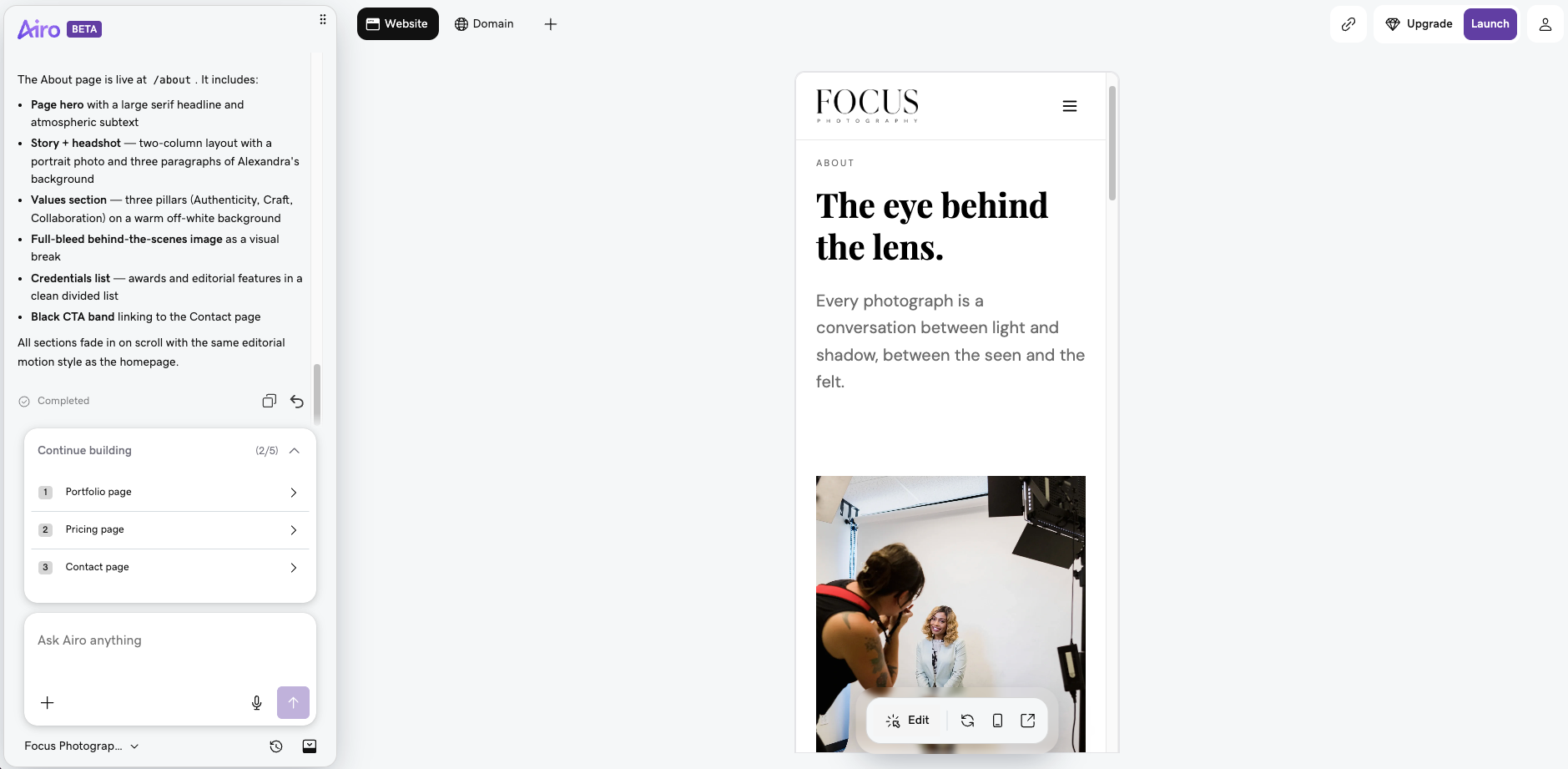
Over time, it’s a good idea to occasionally test your website to be sure that it’s still loading properly on mobile devices. Adding new images or features to your site, for example, can drastically change how your site loads. Check out our full guide on how to do a responsive website test for free tool recommendations.
Here are some final checks to run through before hitting that publish button:
☐ All text copy reviewed and personalized
☐ Real photos added (where needed)
☐ Mobile layout checked
☐ SEO tests completed (Airo AI Builder can do this for you)
☐ Contact form tested
☐ Links within your site are working
☐ Tools/integrations added
It might be tempting to skip the pre-checks, but a quick five-minute review will save you from future headaches.
Related: Website launch checklist
Now that you’ve completed your pre-publish checklist, it’s time to go live! Once you’ve upgraded to the paid plan of your choosing, hit that publish button and let GoDaddy’s award-winning hosting services take it from there.
Publishing your website isn’t the end of the process for launching your business website, though. Some things you’ll want to do now that your site is live include:
- Monitor site analytics: This information is vital for letting you know which parts of your website are working and which aren’t. Keeping an eye on visitor behavior allows you to quickly make changes and improve the user experience.
- Update your content regularly: Adding a blog to your website, for example, is an easy way to keep new content flowing on your website. Airo AI Builder has AI tools to help you both create a blog and write blog posts, making it easier to grow awareness via digital content.
- Continue to scale your site: As your business grows, your site can as well. Adding new features, like booking platforms, events calendars, or a CRM, levels up the functionality of your website, and Airo AI Builder can help add those at any time.
If your website continues to grow, Airo AI Builder will grow with you. Your plan can be upgraded as your needs grow, so don’t sweat it if you find that you need a larger plan in the future.
Other AI features that can benefit your business
We’ve covered how AI can help you quickly stand up a professional website. Now, let’s check out some of the ways AI can boost your business potential in other ways.
Find business name ideas
It can be challenging to come up with a business name that's unique and memorable. This business name generator can save you hours of brainstorming and ensure your name stands out in a crowd. And, once you’ve found a name you like, it’ll check domain availability for you as well.
Once you’ve nailed down your domain name, you can set up email with a custom domain.
Related: Benefits of professional email
Quickly set up your LLC
Setting up an LLC can be a complex process, but AI can simplify it. AI tools will walk you through each step, ensuring you understand and complete the necessary paperwork. It saves you time and potential legal fees, allowing you to focus on what you do best: running your business.
Make an AI-generated logo
A logo is the face of your business, and AI can help you create a logo that's perfect for your brand. An AI-driven logo maker generates unique designs based on your business type and style preferences. You can tweak and refine the designs until you find the one that best represents your brand.
Publish a personalized coming soon page
Generating buzz before your website goes live is crucial. With AI, you can create a personalized coming soon page to engage your audience. The AI will suggest coming soon templates and content that match your brand, making it easy to create a page that builds anticipation for your launch.
As AI technology improves, expect web design to become even more intuitive and personalized. The future likely includes enhanced features, such as real-time customization, conversational interfaces, dynamic graphic generation, and self-healing code.
What kind of websites can be created with AI?
AI website builders offer serious versatility, letting you easily create sites for any purpose. From businesses, creatives, online stores, or bloggers, AI makes professional web design within reach for everyone.
Food and beverage websites
If you own a food and beverage company, Airo AI Builder can help. Create stunning pages that highlight your gourmet offerings, as well as online ordering tools to drive business both in-store and online.
Related: How to build a restaurant website
Services business website (beauty, home services, legal, accounting)
AI can take on the heavy lifting when it’s time to make a business website, automatically including essential features like contact forms, service pages, and booking systems. You can count on AI to cover the finer points, too, like an effective business website homepage.
These platforms also offer scalability and business-focused integrations, making it easy to add new services, manage appointments, or connect with marketing tools as your business grows and evolves.
Portfolio websites (authors, creatives)
For artists, designers, and professionals, AI tools unlock the capability to create stunning portfolios by suggesting visually appealing layouts and streamlining the upload process.
These platforms make it easy to organize and present work beautifully, helping attract clients and showcase unique style and talents with minimal effort. With AI, your online presence can stand out as one of the best examples of portfolio websites.
Events websites
Airo AI Builder can help with event planning websites, no matter if you’re launching a wedding website or a sign-up for local and community events.
And if you need to start a blog as part of that event website, it’s easier than ever with AI tools. These can generate topic ideas, assist with personal branding, and incorporate built-in SEO optimization.
This can give you a big boost in creating engaging content, increasing online visibility, and growing an audience.
Business directories and marketplace websites
A business directory is an organized listing or catalog of businesses, categorized by industry, location, or product/service type. Examples include Yelp, Yellow Pages, TripAdvisor, etc. Marketplaces would include sites like Amazon, Etsy, Walmart, etc.
Airo AI Builder enables business owners to create their own business directories or marketplaces without needing to hire a developer.
Web apps and custom dashboards
Airo AI Builder can also help to quickly create web apps and custom dashboards for businesses, going beyond simple website creation. If your business needs features like client portals, booking systems, or data trackers, these systems can be created without any coding, and the backend is built in, saving you time and replacing manual processes.
How does GoDaddy Airo AI Builder compare to other AI website builders?
GoDaddy Airo AI Builder offers a robust website builder that also includes powerful integrations that competitors don’t, such as:
- Web app builder
- Custom dashboard builder
- Full code export capabilities
- Built-in hosting and SSL
- Multi-language support
- Analytics dashboard
- Website security
These features, coupled with GoDaddy’s trusted hosting ecosystem, offer an easy way to create a modern app or website. All without any coding or developers required.
See our comparisons: GoDaddy Airo AI Builder vs Base44 and GoDaddy Airo AI Builder vs Hostinger Horizons: Which AI builder actually wins for small businesses?
Best practices for building a website with AI
In your quest to create a website with AI, selecting the best tool is key. You’ll want to choose a tool that is not only robust but also tailored to your specific needs. Once you’ve selected the AI website builder, it's crucial to provide accurate information about your business. This will ensure that AI can generate an accurate representation of your brand online.
Remember, AI is only as good as the data fed to it, but it can still hallucinate information, so double-check your details.
The beauty of AI is its rapid building capabilities. It offers a quick, easy, and efficient way to establish an online presence. Leverage this to your advantage and stay ahead of the curve.
Common mistakes to avoid when using an AI website builder
We’ve discussed best practices, but here is a quick list of common mistakes to be aware of when creating your website:
- Publishing your website without reviewing or personalizing the AI output.
- Using all stock/AI images with no real brand photos.
- Ignoring the mobile layout of your website.
- Skipping SEO best practices before going live.
- Writing vague, general prompts within the builder.
- Not using a custom domain name.
FAQs about creating a website with AI
Does GoDaddy have an AI website builder?
Yes, GoDaddy Airo AI Builder empowers anyone to quickly create a professional website. Its intuitive AI-driven platform generates layouts, content, and branding in minutes. With built-in SEO, ecommerce tools, and customization options, Airo AI Builder can help businesses, creatives, and entrepreneurs launch and grow their online presence effortlessly.
Do I need coding experience to use Airo AI Builder?
No, coding experience is not required to use GoDaddy Airo AI Builder. Using the chat interface, users are empowered to describe the feature they’d like to build, and Airo AI Builder will build it.
What information should I prepare before using an AI website builder?
Before using an AI website builder, it helps to have a few things ready: your basic details (business name, industry, and site purpose), your target audience and goals, and any branding assets like your logo, colors, and fonts. You should also prepare key content such as your tagline, "About" copy, and product or service descriptions, along with any photos or visuals you want to use. Also, have your contact information, social media links, and a preferred domain name on hand. The more detail you provide upfront, the more accurate and usable the AI's output will be.
How long does it take to build a website with Airo AI Builder?
Airo AI Builder allows you to create a website within minutes. Once you’ve tailored the website to fit your needs, just hit publish, and your business is online the same day.
Can I edit or improve the site after AI builds it?
Yes. With Airo AI Builder, you have full customization control both after your site is generated and after it's published, so you're never locked into the initial output. You can continue to refine and update your site at any time to keep it looking and functioning exactly the way you want. And if you find yourself needing more credits or resources along the way, you can upgrade to a higher tier at any time to keep your project moving forward.
Can AI help improve an existing website?
Yes. Airo AI Builder makes it easy to improve an existing website rather than starting from scratch. You can rebuild from a URL by simply pasting your existing site's link, allowing the AI to keep what's already working while making improvements. You can also attach files directly to your first prompt — whether that's a document, image, HTML file, or zip folder — giving the AI everything it needs to understand your current site and suggest improvements.
Can I use my own images and brand assets?
Yes. While Airo AI Builder offers high-quality stock images for websites, you’re able to replace any images within the builder with your own assets.
Who owns the code and content I create?
Code created within Airo AI Builder belongs to you and can be downloaded from within the builder. Airo AI Builder also allows you to directly edit your code, if desired.
Can I connect my own domain?
Yes, you can use your own domain name with Airo AI Builder.
How do I make an AI-generated website look unique?
To make an AI-generated website look unique, start by customizing the template the AI provides rather than leaving it as-is. Swap in your own photos and visuals instead of stock images, and apply your brand's specific colors, fonts, and tone of voice throughout. Adjust the layout, spacing, and section order to better reflect your style, and add personal touches like a custom logo, original copy, and authentic content that reflects your brand's personality.
How much does it cost to create a website with AI?
The cost of creating a website with an AI website builder varies depending on the platform and your needs. Paid plans typically range from around $10 to $50 per month, covering features like a custom domain, ecommerce tools, and customer support. Premium or business-tier plans can cost more. It's worth noting that while the AI building tool itself may be free or low-cost, additional expenses like a custom domain name (usually $10–$20 per year) or premium assets can add up.
How secure are AI-generated websites?
Websites built with Airo AI Builder run on GoDaddy's enterprise-grade infrastructure — one of the most trusted hosting platforms in the world. Every site automatically includes SSL encryption and built-in DDoS protection, which shields your site from malicious attacks, while automatic backups ensure your content is never lost. Airo AI Builder also applies best-practice security hardening across the board. Paired with 99.9% uptime and global edge hosting, you can focus on growing your site without worrying about vulnerabilities or downtime.
Disclaimer: When using AI tools, avoid entering sensitive information and always review output for accuracy.